AKS IAM Posture Implementation
This repository contains Infrastructure-as-Code and RBAC configurations for deploying AKS clusters with a comprehensive IAM posture aligned with enterprise security requirements.
Overview
This implementation supports:
- Nothing-Shared SaaS Model - Isolated AKS clusters per customer/environment
- Persona-Based Access - Role-based access aligned with operational responsibilities
- Entra ID Integration - All access via Entra ID groups (no individual assignments)
- JIT Elevation via PIM - Time-bound elevated access for privileged operations
- Comprehensive Audit Logging - All actions logged to Log Analytics
Architecture
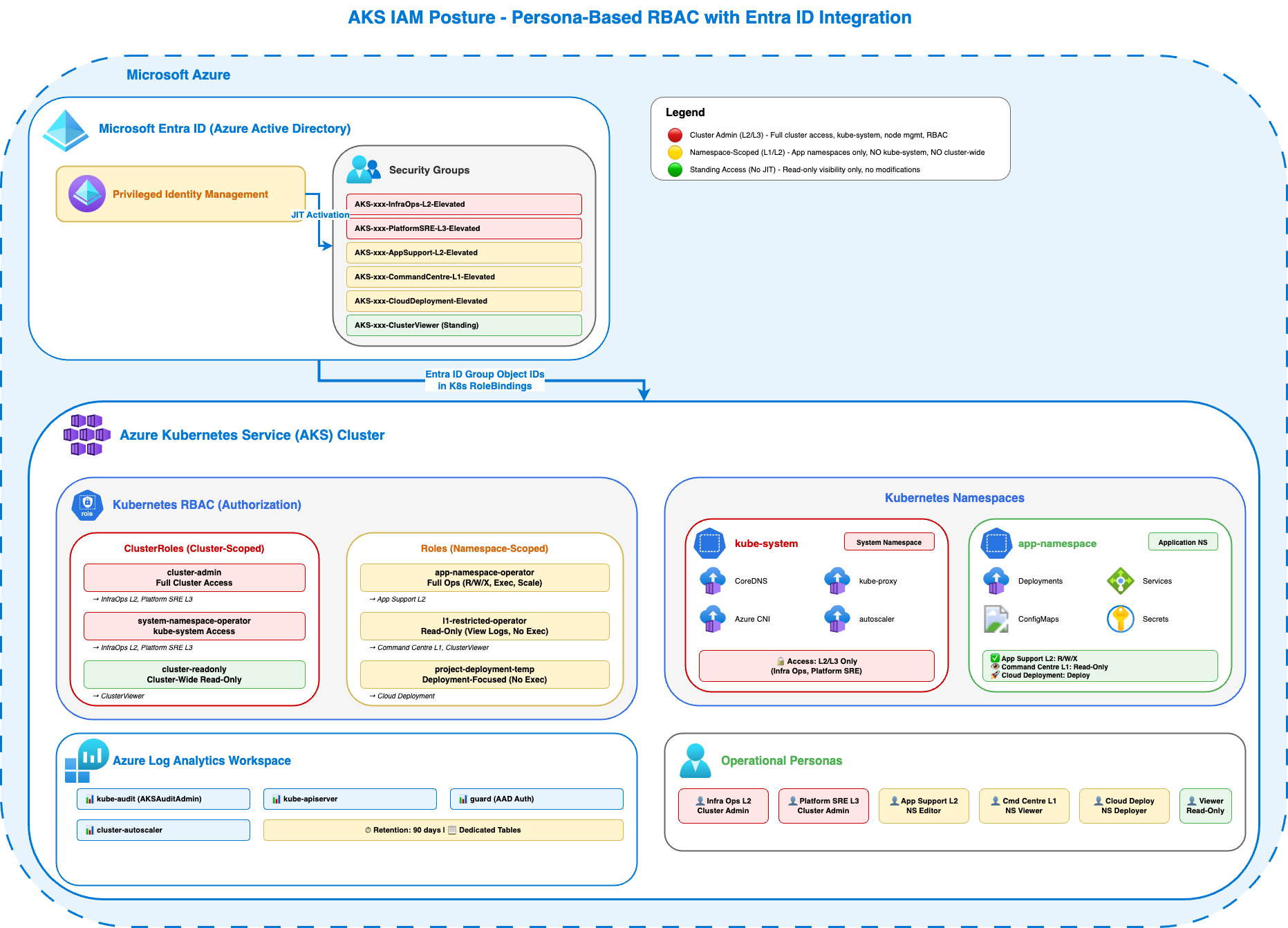
Persona-based RBAC architecture with Entra ID integration, PIM-based JIT elevation, and comprehensive audit logging to Azure Log Analytics.
Directory Structure
├── infra/                          # Infrastructure-as-Code
│   ├── bicep/                      # Bicep deployment
│   │   ├── main.bicep              # AKS cluster deployment
│   │   └── main.bicepparam         # Bicep parameter file
│   └── terraform/                  # Terraform configuration
│       ├── main.tf                 # AKS cluster resources
│       ├── variables.tf            # Input variables
│       ├── outputs.tf              # Output values
│       ├── versions.tf             # Provider versions
│       └── terraform.tfvars        # Variable values
├── rbac/                           # Kubernetes RBAC manifests
│   ├── group-ids.env.example       # Template for kustomize group ID env vars
│   ├── cluster/                    # Cluster-scoped roles & bindings
│   │   ├── cluster-roles.yaml
│   │   ├── cluster-rolebindings.yaml
│   │   └── kustomization.yaml
│   └── namespace/                  # Namespace-scoped roles & bindings
│       ├── namespace-roles.yaml
│       ├── namespace-rolebindings.yaml
│       └── kustomization.yaml
├── scripts/                        # Deployment & validation scripts
│   ├── validate-rbac.sh            # Validate infrastructure & config
│   ├── validate-persona-permissions.sh  # Validate user permissions
│   ├── deploy-rbac-multi-cluster.sh
│   ├── setup-demo-accounts.sh      # Create demo Entra ID users & groups
│   └── cleanup.sh                  # Remove all created resources
└── docs/                           # Documentation
    ├── README.md                   # Full implementation guide
    └── group-config-template.env   # Entra ID group configuration
Quick Start
0. Setup Env Vars
export RESOURCE_GROUP=
export CLUSTER_NAME=
export LAW_NAME=
export TENANT=
1. Deploy AKS Cluster
Option A: Bicep
# Copy example parameters and update with your values
cp infra/bicep/main.bicepparam.example infra/bicep/main.bicepparam
vi infra/bicep/main.bicepparam

# Update these values:
#   - clusterName
#   - location
#   - clusterAdminGroupObjectIds (Entra ID group object IDs)
#   - logAnalyticsWorkspaceResourceId (optional)
#   - tags

cd infra/bicep/

# Deploy
az deployment group create \
  --resource-group $RESOURCE_GROUP \
  --template-file main.bicep \
  --parameters main.bicepparam
Option B: Terraform
# Copy example parameters and update with your values
cp infra/terraform/terraform.tfvars.example infra/terraform/terraform.tfvars
vi infra/terraform/terraform.tfvars

# Update these values:
#   - cluster_name
#   - resource_group_name
#   - location
#   - cluster_admin_group_object_ids (Entra ID group object IDs)
#   - log_analytics_workspace_id (optional)

cd infra/terraform/

# Initialize and deploy
terraform init
terraform plan
terraform apply

# Get kubectl credentials
az aks get-credentials --resource-group $RESOURCE_GROUP --name $CLUSTER_NAME
2. Create Demo Accounts
Create demo Entra ID users and groups for each persona using the setup script:
./scripts/setup-demo-accounts.sh --domain $TENANT --cluster $CLUSTER_NAME
This creates:
- Entra ID groups (e.g.,
AKS-<ClusterName>-InfraOps-L2-Elevated) - Demo users for each persona (e.g.,
demo-infraops@yourtenant.onmicrosoft.com) - Group memberships mapping each user to their corresponding group
rbac/cluster/group-ids.envandrbac/namespace/group-ids.env— used by kustomize when applying RBAC in the next step- Adds the current Azure CLI identity to the InfraOps-L2-Elevated group to prevent cluster lockout (use
--skip-self-addto opt out)
Note: Requires Azure CLI logged in with Entra ID admin permissions (ability to create groups and users).
After running the script, update the cluster’s Entra ID admin groups with the new group IDs:
source demo-accounts-${CLUSTER_NAME}.env
az aks update \
  --resource-group $RESOURCE_GROUP \
  --name $CLUSTER_NAME \
  --aad-admin-group-object-ids "$INFRA_OPS_L2_GROUP_ID,$PLATFORM_SRE_L3_GROUP_ID"
Important: After
az aks update, your Entra ID access token still reflects your old group memberships. You must re-authenticate to get a token with the new group claims beforekubectlwill work:
# Re-authenticate to refresh group claims in your token
az logout && az login

# Refresh kubeconfig
az aks get-credentials --resource-group $RESOURCE_GROUP --name $CLUSTER_NAME --overwrite-existing
kubelogin convert-kubeconfig -l azurecli
3. Apply RBAC
# Apply cluster-wide RBAC (kustomize injects group IDs from rbac/cluster/group-ids.env)
kubectl apply -k rbac/cluster/

# Apply to each application namespace
kubectl apply -k rbac/namespace/ -n <APP_NAMESPACE>
4. Validate
Validate Infrastructure and Configuration
./scripts/validate-rbac.sh $RESOURCE_GROUP $CLUSTER_NAME $LAW_NAME
This validates:
- Azure RBAC disabled (using Kubernetes RBAC)
- Local accounts disabled
- Custom RBAC roles deployed
- Cluster-admin not broadly assigned
- kube-system access restricted
- Diagnostic settings configured
- Audit logs flowing to Log Analytics
Validate Persona Permissions
# Run persona validation
./scripts/validate-persona-permissions.sh demo-accounts-<CLUSTER_NAME>.env
This validates each persona by impersonating users with kubectl auth can-i and testing:
- ✅ Positive tests - Expected permissions work (e.g., App Support can view logs and exec into pods)
- ❌ Negative tests - Restricted permissions are denied (e.g., cannot access kube-system)
- 🌐 Scope tests - Cluster-wide vs namespace-scoped access boundaries
- 🔒 Privilege tests - Read vs write capabilities for each role
Tests performed per persona:
- Infra Ops L2 / Platform SRE L3: Full cluster admin (5 tests each)
- App Support L2: Namespace editor with exec (8 tests)
- Command Centre L1: Namespace read-only (7 tests)
- Cloud Deployment: Deployment-only access (6 tests)
- Viewer: Cluster-wide read-only (6 tests)
All tests must pass to confirm proper least-privilege access controls.
Personas & Permissions
| Persona | Scope | Key Permissions | JIT |
|---|---|---|---|
| Infra Ops (L2) | Cluster-wide | Full admin, kube-system access | ✅ |
| Platform SRE (L3) | Cluster-wide | Full admin, kube-system access | ✅ |
| App Support (L2) | App namespaces | Logs, exec, scale, restart | ✅ |
| Command Centre (L1) | App namespaces | Logs, restart (no exec) | ✅ |
| Cloud Deployment | App namespaces | Deploy + troubleshoot | ✅ |
Documentation
See docs/README.md for:
- Complete deployment guide
- Entra ID group naming conventions
- PIM configuration guidance
- Validation checklist
- Troubleshooting guide
Cleanup
To remove everything created by this setup, run scripts/cleanup.sh:
# Remove only Entra ID users, groups, RBAC, and the generated .env file
./scripts/cleanup.sh --cluster <CLUSTER_NAME>

# Also destroy Terraform-managed infrastructure
./scripts/cleanup.sh --cluster <CLUSTER_NAME> --infra-tool terraform

# Also destroy Bicep-managed infrastructure (resource group delete)
./scripts/cleanup.sh --cluster <CLUSTER_NAME> --infra-tool bicep --resource-group <RESOURCE_GROUP>

# Also remove namespace-scoped RBAC from a specific namespace
./scripts/cleanup.sh --cluster <CLUSTER_NAME> --namespace <APP_NAMESPACE>

# Skip confirmation prompt
./scripts/cleanup.sh --cluster <CLUSTER_NAME> --yes
The script removes, in order:
- Kubernetes ClusterRoles and ClusterRoleBindings (and namespace RBAC if
--namespaceis given) - Entra ID demo users (
demo-infraops,demo-platformsre, etc.) - Entra ID groups (
AKS-<ClusterName>-*) - AKS infrastructure (if
--infra-toolis specified) - Generated
demo-accounts-<CLUSTER_NAME>.envfile
Use --skip-rbac, --skip-users, --skip-groups, --skip-infra, or --skip-env-file to omit individual steps.
Security Features
- ✅ Azure RBAC for Kubernetes authorization
- ✅ Local accounts disabled (Entra ID enforced)
- ✅ Comprehensive audit logging
- ✅ Namespace isolation (app teams can’t access kube-system)
- ✅ No wildcard permissions
- ✅ Group-based access only
License
Internal use only.