Container Offer Architecture
Architecture guide for container-based Azure Marketplace offers.
Overview
An Azure Container Offer on the Azure Marketplace lets partners package and sell Kubernetes-based applications to customers. The complexity of your offer depends on how much infrastructure you need to deploy and who manages it.
This guide walks through a Crawl → Walk → Run approach so you can pick the simplest path that meets your requirements.
Crawl: Helm Chart on an Existing Cluster (Simplest)
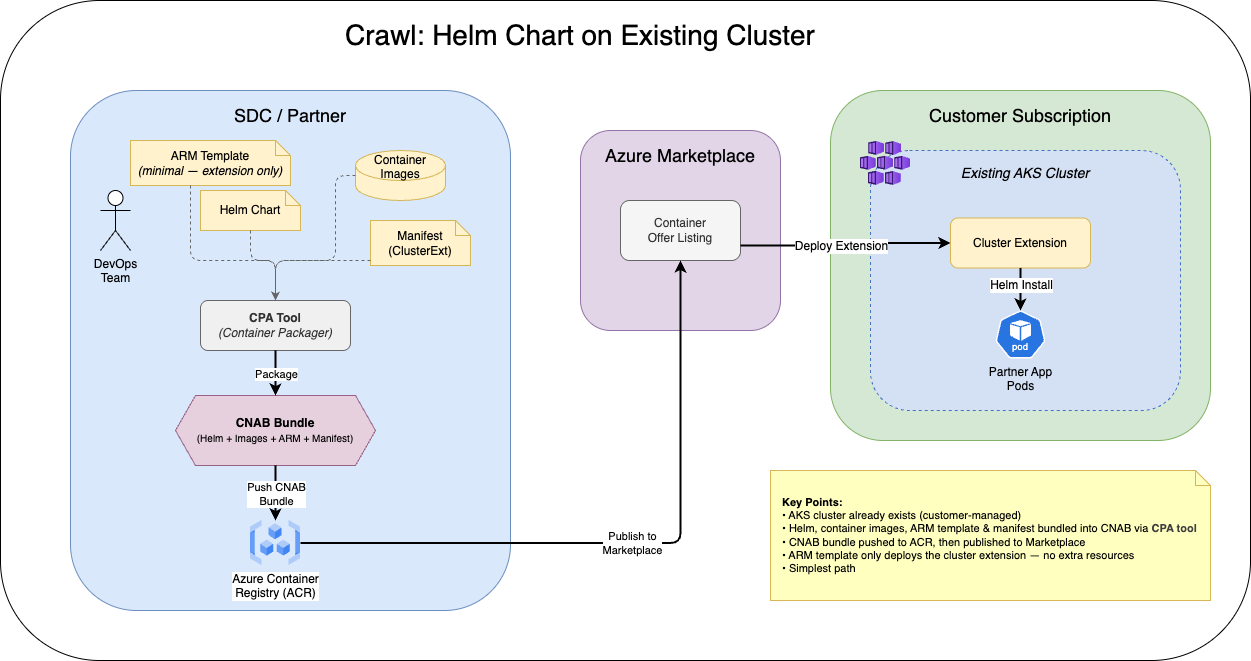
When to use: Your application can be fully deployed via a Helm chart to a customer’s existing AKS cluster. You don’t need to provision any additional Azure resources.
What this means:
- The customer already has an AKS cluster running
- Your entire application is packaged as a Helm chart (containers, services, config)
- Your ARM template is minimal — it essentially invokes the Helm chart deployment via the Kubernetes extension
- No extra Azure resources (databases, storage accounts, etc.) are needed
Actions:
- Package your application as a Helm chart
- Push container images to ACR (Azure Container Registry)
- Create a minimal ARM template that deploys the Helm chart via the
Microsoft.KubernetesConfiguration/extensionsresource type - Create the offer in Partner Center and upload artifacts
This is the easiest path. If you can make this work, start here.
Walk: Helm Chart + Additional Azure Resources
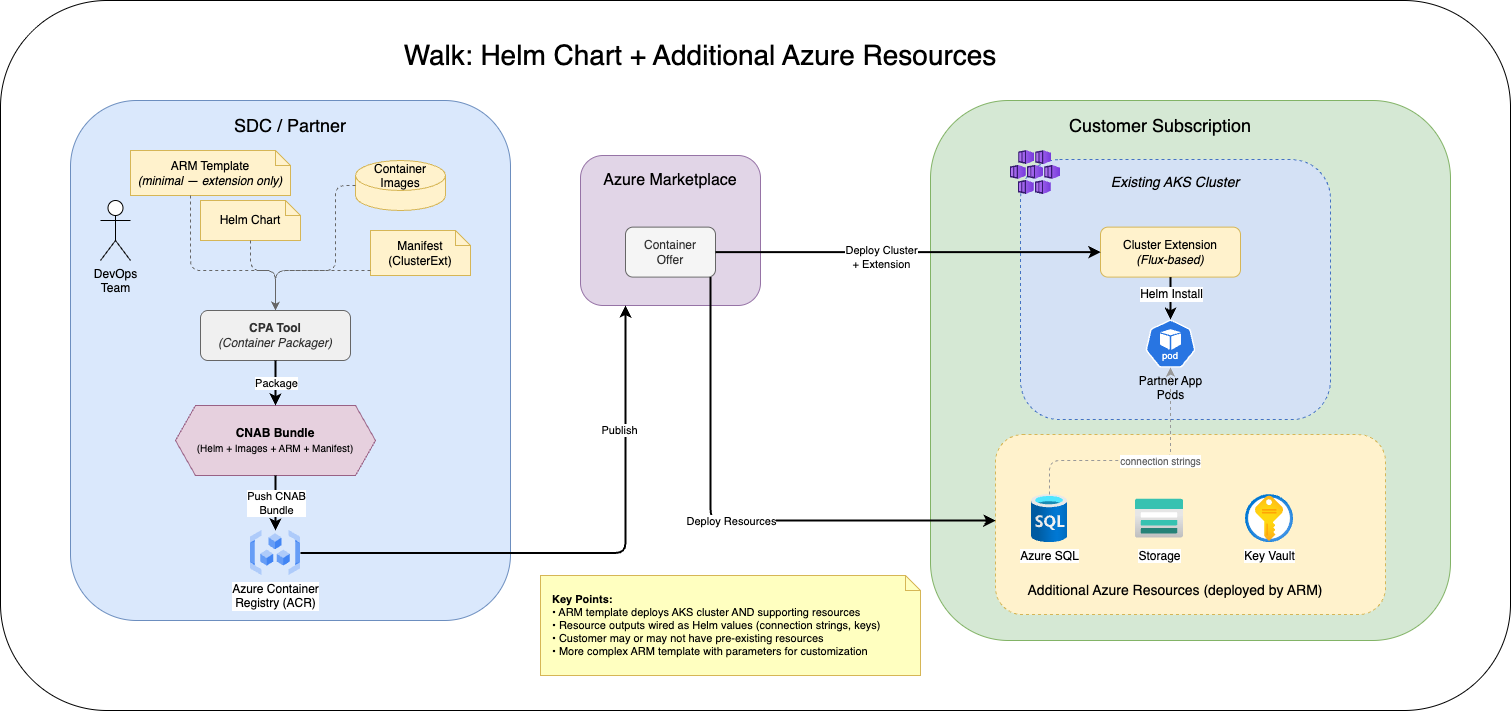
When to use: Your application needs the Helm chart deployment AND additional Azure resources (e.g., Azure SQL, Cosmos DB, Storage Account, or even the AKS cluster itself).
What this means:
- Everything from the Crawl stage, plus…
- You need a more substantial ARM template that deploys supporting Azure resources
- The ARM template creates the resources, then deploys the Helm chart to the cluster
- The customer may or may not already have the AKS cluster (your template can create one)
Actions:
- Complete all steps from the Crawl stage
- Create an ARM template that provisions required Azure resources (networking, databases, AKS cluster, etc.)
- Wire up resource outputs (connection strings, endpoints) as Helm chart values
- Test end-to-end deployment in a clean subscription
Key considerations:
- Keep the ARM template modular — separate infrastructure from the app deployment
- Use ARM template parameters so customers can customize resource sizing/naming
- Consider what happens if the customer already has some resources (e.g., an existing VNet)
Run: Azure Managed Application (Most Complex)
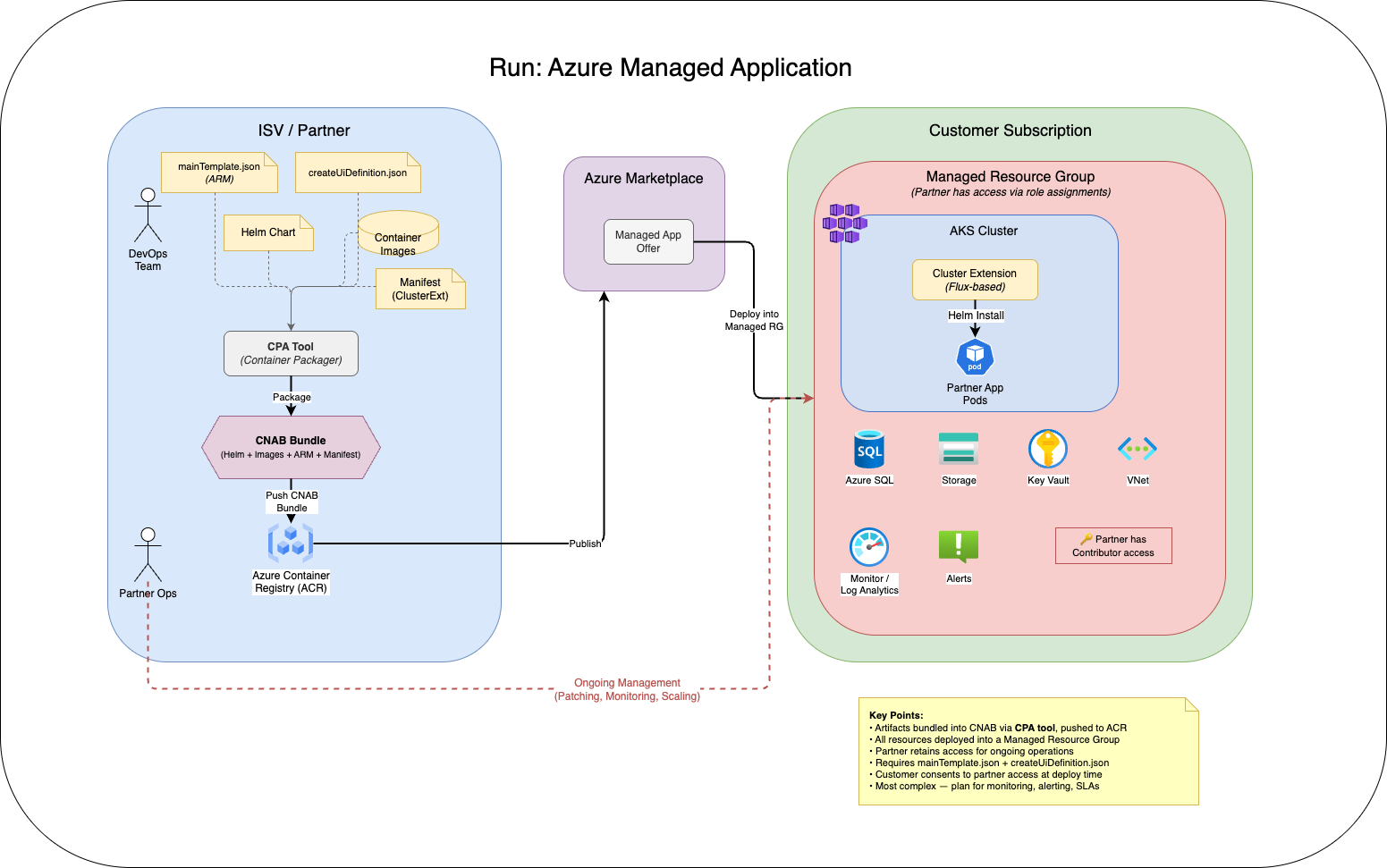
When to use: The partner needs ongoing access to manage the infrastructure, data plane, or cluster on behalf of the customer.
What this means:
- Everything from the Walk stage, plus…
- The application is deployed as an Azure Managed Application
- Resources are deployed into a managed resource group that the partner has access to
- The partner can perform ongoing operations: patching, monitoring, scaling, data management
Actions:
- Complete all steps from the Walk stage
- Create a
mainTemplate.json(ARM) andcreateUiDefinition.json(portal wizard) - Define the publisher’s access level via role assignments in the managed app definition
- Package as a Managed Application offer in Partner Center
- Build operational runbooks for managing the customer’s deployment
Key considerations:
- Access model: Determine what level of access you need (Contributor, Reader, custom role)
- Customer trust: Customers must consent to the partner having access to their managed resource group
- Billing complexity: Managed apps can use different billing models (flat rate, metered, BYOL)
- Operational burden: You are now responsible for the health of the deployment — plan for monitoring, alerting, and incident response
Decision Guide
| Question | Crawl | Walk | Run |
|---|---|---|---|
| App deploys entirely via Helm? | ✅ | ✅ | ✅ |
| Needs additional Azure resources? | ❌ | ✅ | ✅ |
| Partner manages infra/data post-deploy? | ❌ | ❌ | ✅ |
| Customer must have existing AKS cluster? | ✅ | Maybe | ❌ |
| ARM template complexity | Minimal | Moderate | High |
| Time to implement | Days | Weeks | Weeks+ |
Other Considerations
- CNAB Bundles: Container offers use CNAB (Cloud Native Application Bundle) under the hood. The Marketplace + CPA tool handles most of this for you, but understanding the bundle structure helps with debugging.
- Cluster Extensions: The deployment mechanism uses AKS Cluster Extensions. Your Helm chart is deployed as an extension instance.
- Update strategy: Plan how you’ll ship updates to deployed customers. Cluster extensions support auto-upgrade channels.
Troubleshooting
Container image vulnerabilities
The Marketplace certification process scans all container images for known CVEs. Vulnerabilities are the most common reason offers get rejected or delayed.
Fix: Run Trivy locally before submitting:
# Scan a single image
trivy image your-registry.azurecr.io/your-app:latest

# Scan all images referenced in your Helm chart
trivy config ./your-helm-chart
Integrate Trivy into your CI/CD pipeline so vulnerabilities are caught before they reach certification. Pay attention to HIGH and CRITICAL findings — these will block your offer.
Portal UI definition errors
The createUiDefinition.json file defines the portal wizard customers see at deploy time. Syntax errors or invalid control references won’t surface until you try to deploy through the portal.
Fix: Use the sandbox test tool to validate your UI definition before publishing:
- Open the test tool URL in the Azure portal
- Upload your
createUiDefinition.json - Walk through the wizard to verify all steps render correctly
- Check that output values map to your
mainTemplate.jsonparameters
ARM template validation failures
ARM templates that work in isolation may fail during Marketplace certification due to stricter validation rules.
Fix:
- Run
az deployment group validateagainst a clean resource group before submitting - Avoid hardcoded resource names — use
uniqueString()to prevent naming collisions - Check that all API versions are current and not deprecated
Cluster extension deployment failures
The Helm chart deploys via cluster extension. Failures here are often caused by incorrect values, or RBAC issues.
Fix:
- Verify all images referenced in your Helm chart are accessible from the target ACR
- Check extension status:
az k8s-extension show --name <ext-name> --cluster-name <cluster> --resource-group <rg> --cluster-type managedClusters
CNAB bundle packaging errors
The CPA tool may fail if artifacts are misconfigured or the manifest references images that don’t exist in the registry.
Fix:
- Ensure all container images are pushed to the ACR before running the CPA tool
- Validate the manifest file references match the actual image tags
- Check CPA tool output logs for specific error messages
References
- Samples repo: Azure-Samples/kubernetes-offer-samples — ARM templates, Helm charts, and CNAB examples for each scenario
- MS Learn docs: Marketplace Container Offers — Official documentation for creating and publishing container offers
- Mastering the Marketplace (Container): microsoft.github.io/Mastering-the-Marketplace/container — Video walkthroughs and hands-on labs